

In short
- HEIC is the iPhone’s photo format. Windows needs an extension to show it.
- Converting to JPG makes the photo open on any computer and website.
- Convert HEIC to JPG for free
You copy photos from an iPhone to a Windows PC, or someone emails them to you, and they end in .HEIC. Double-click, and Windows says it needs an extension, or shows nothing at all. Upload forms refuse them too.
Nothing is wrong with the photos. HEIC is simply the format iPhones save in. This guide shows the three ways around it: an extension for Windows, a setting on the iPhone, or converting the photos to JPG.
On EditFlip, step by step
- Step 1
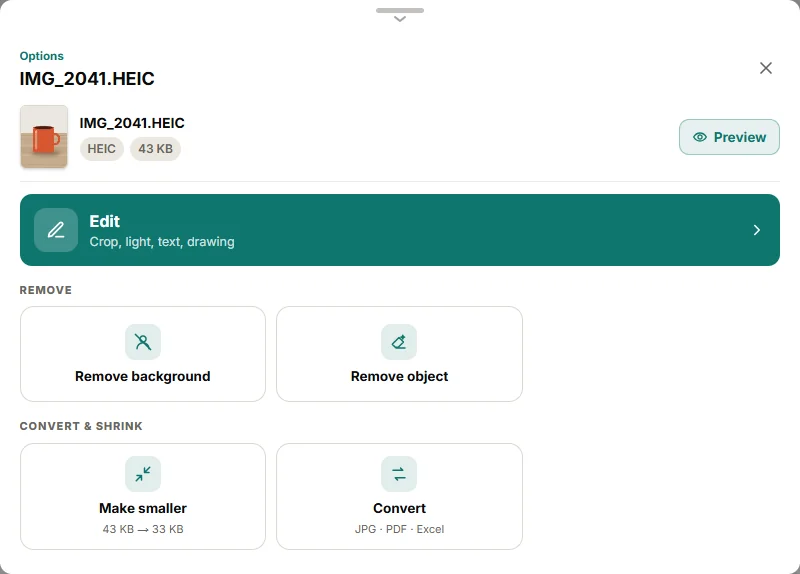
Choose the HEIC photos
On the EditFlip home page, press Choose files and pick the HEIC photos, or drop them on the page. They open straight away, with a preview, even on a PC that cannot show HEIC itself.
- Step 2
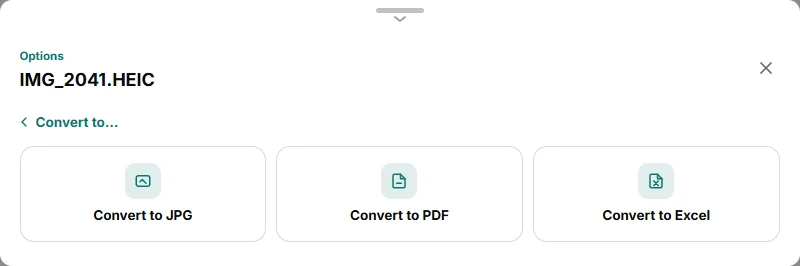
Press Convert, then Convert to JPG
Press Convert and pick Convert to JPG. PDF is there too, if you want the photos as a document.
- Step 3
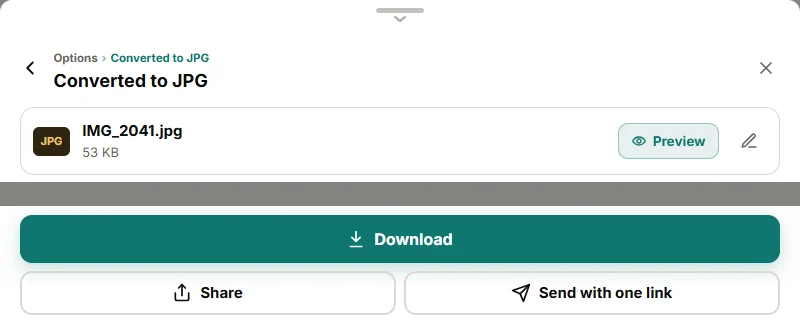
Download the JPGs
The photo is a JPG with the same name. Press Download. Several photos at once download together in one ZIP.
What HEIC is
Apple calls it HEIF, High Efficiency Image File Format, and its files end in .HEIC. Apple uses it because it keeps photos the same quality in less space than JPEG.
The catch is that not everything reads it. Windows, many websites and older apps expect JPG.
Option 1: the extension for Windows
Microsoft explains that the Photos app may show “You need an extension to use this file” for HEIF files. Its easiest fix is two extensions from the Microsoft Store: HEIF Image Extensions, which is free, and HEVC Video Extensions, listed at $0.99.
Microsoft says you need both, even if you only plan to open photos. After that, Photos opens HEIC files like any other picture. Websites and other apps may still refuse them.
Option 2: let the iPhone save JPG
Apple lets you switch the camera to the older format. Open Settings, tap Camera, tap Formats, then tap Most Compatible. Apple says all new photos and videos will then use JPEG or H.264.
That only changes new photos. The ones you already took stay HEIC, and the files get bigger from now on.
Option 3: convert to JPG
Converting gives you JPG files that open everywhere, with nothing to install. EditFlip reads HEIC inside your browser, so it works on any Windows PC.
Photos are turned the right way up as they are converted. If you also need them smaller for a form, press Make smaller on the result.
Copying photos from iPhone to PC
Apple notes that when you import HEIF media from an iPhone into a PC, it might be converted to JPEG, unless Keep Originals is chosen in Settings, Apps, Photos.
Microsoft adds that many devices convert HEIC photos to a more common format when the files are transferred or emailed. So the same photos can arrive as JPG one day and HEIC the next, depending on how they were sent.
iPhone photos to JPG in your browser, one or many at once. Free, no account, nothing to install, and the photos stay on your device.
Convert HEIC to JPG on EditFlip →Questions
Why can’t I open HEIC files on Windows?
Windows needs Microsoft’s HEIF Image Extensions to show them. Or convert them to JPG, which opens everywhere.
How do I convert HEIC to JPG for free?
Open the photos on EditFlip, press Convert, then Convert to JPG, and download.
How do I stop my iPhone saving HEIC?
Go to Settings, Camera, Formats and choose Most Compatible. New photos are then saved as JPEG.
Are my photos uploaded?
No. EditFlip converts them inside your browser, so they stay on your device.