
In short
- Big PDFs are big because of the photos inside them, not the text.
- Good compression shrinks the photos and leaves the text sharp.
- Make your PDF smaller for free
The email bounces, the upload form says “maximum 5 MB”, or the PDF takes ages to open on a phone. A scanned contract or a report full of photos easily ends up tens of megabytes.
Most of that size is pictures stored at far more detail than a screen or a printer needs. This guide shows how to shrink a PDF in your browser, what it does to the pages, and the limits worth knowing.
On EditFlip, step by step
- Step 1
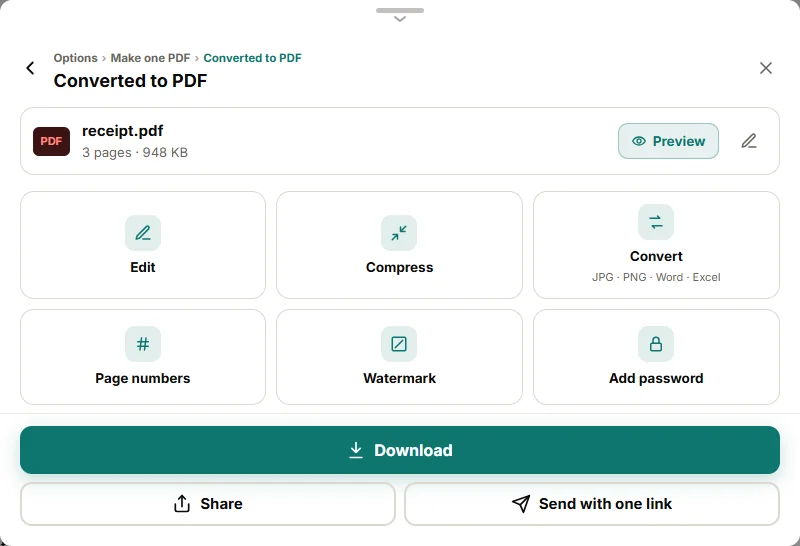
Choose the PDF and press Compress
On the EditFlip home page, press Choose files and pick the PDF. In the panel, press Compress. You can choose several PDFs at once and compress them together.
- Step 2
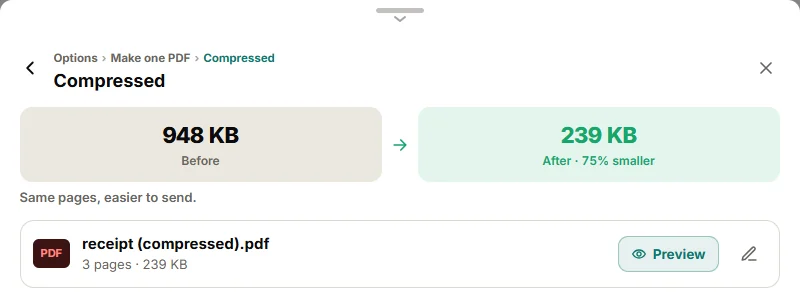
See how much smaller it got
EditFlip shows the size before and after, and how much smaller the file is. A PDF of three photographed receipts went from 948 KB to 239 KB, 75% smaller.
- Step 3
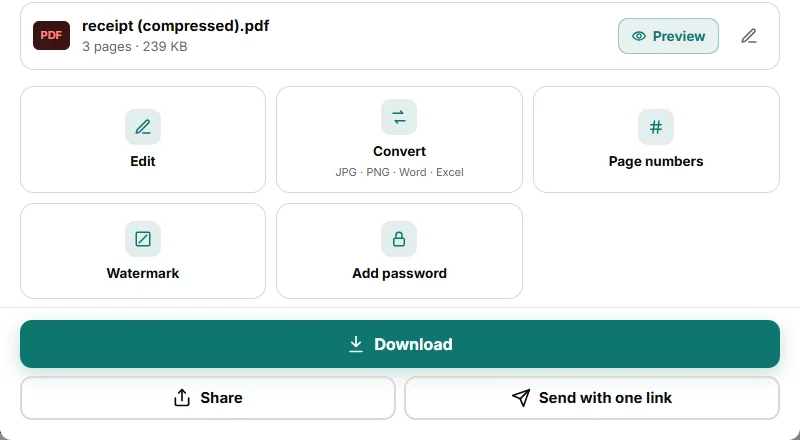
Download it
The new file has “(compressed)” in its name. Press Download, or Share on a phone, or go on with another tool such as Add password.
Why some PDFs are huge
Text takes almost no space. Photos and scans are what make a PDF big, especially photos straight from a phone camera at full resolution.
A scanned document is all pictures: every page is a photo of paper. That is why a ten page scan can be bigger than a whole book of plain text.
What EditFlip’s Compress changes
Only the photos inside the PDF are made smaller. They get fewer pixels, up to 2,000 on the long side, which is about 150 dots per inch on a full A4 page, and are saved again as JPEG. Then the whole file is written again as compactly as it can be.
Text, fonts and drawings stay exactly as they were. The text can still be selected, searched and copied, which is not true of tools that turn every page into one picture.
When nothing gets smaller
A PDF that is mostly text, or one already compressed, has little to take away. When compressing would not make it meaningfully smaller, EditFlip says the PDF is already as small as it gets and leaves it alone.
In that case, look at what is in the file. Removing pages nobody needs, or splitting it into two files, may be the real fix.
Email limits
Google says the attachment limit for personal Gmail accounts is 25 MB, and that a larger attachment is automatically removed and added as a Google Drive link instead. Work and school accounts have limits set by their administrator.
Upload forms are often stricter, 2 MB, 5 MB or 10 MB. Check the limit before you compress, so you know how small you need to go.
On a Mac: Preview
Preview can reduce a PDF’s size too. Apple’s steps are to choose File > Export and pick Reduce File Size in the Quartz Filter pop-up menu, then click Save.
Apple notes that the compressed PDF may be of lower quality than the original. Open the result and zoom in on small print before you send it.
Before you send it
Open the compressed PDF and zoom in on a page with small text or a signature. At 150 dots per inch, normal documents look sharp on screen and in print.
Keep the original. If someone needs the full quality version later, for printing a photo large for example, you still have it.
Smaller photos, same text, same pages. See the size before and after. Free, no account, and your PDF stays on your device.
Compress a PDF on EditFlip →Questions
How do I make a PDF smaller to email?
Open it on EditFlip and press Compress. Photos inside are made smaller, and the text stays as it is.
Will compressing make the text blurry?
No. EditFlip only shrinks the photos inside the PDF. Text and fonts stay exactly as they were.
Why didn’t my PDF get smaller?
It has little to shrink, usually because it is mostly text or already compressed. EditFlip tells you when that is the case.
Is my PDF uploaded?
No. EditFlip compresses it inside your browser, so it never leaves your device.